


 AI
An Arabic-first Sitecore site gives Arabic readers the same content, features and speed as English readers, on pages designed and tested in Arabic. A mirrored layout with translated text is only a right-to-left site. Parity also needs mixed text in the right order, numbers set for each market, search that understands Arabic spelling, and a workflow that publishes both languages together.
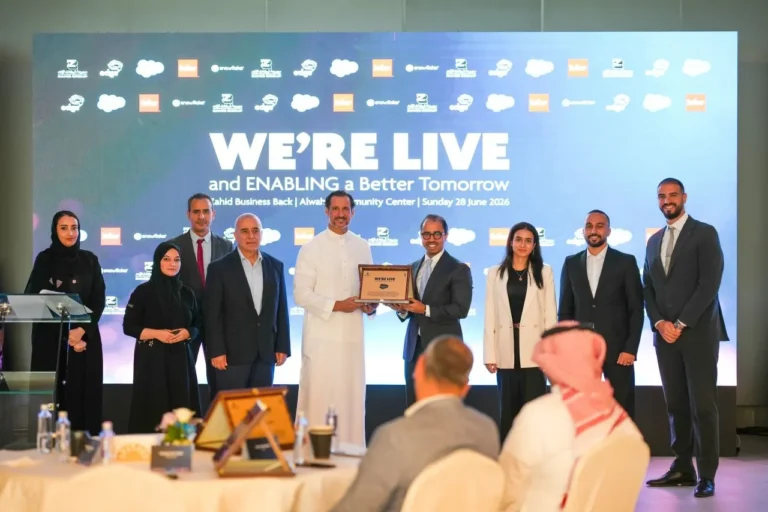
Our Sitecore practice works in Arabic and English across the Gulf and Egypt. EgyptAir, Egypt’s flag carrier, chose SitecoreAI for its digital front end and Salesforce for passenger CRM, with Arcsen leading the implementation. Here is what we check on a bilingual estate, and how to test it.
Prefer Arabic? Read our دليل Sitecore بالعربية, a guide to Sitecore and right-to-left builds written in Arabic.
How should a Sitecore front end handle right to left?
Set direction and language in the markup. W3C advises dir="rtl" on the html element of a right-to-left page, warns against setting base direction in CSS, and asks for a language attribute on the html tag and on any element that switches language. In a headless SitecoreAI build, your front-end application writes these attributes, so take them from the route’s language. Page builder edits through an editing host built from the same code, so Arabic editors see right to left only when the code sets it.
Write the CSS once with logical properties such as margin-inline-start and text-align: start. They follow the writing direction, so the layout mirrors without a second stylesheet. Mirror directional icons such as arrows and carousels, and leave logos and media play buttons alone.
How do you handle mixed Arabic and English text?
Arabic pages carry Latin script and Western digits: brand names, codes, emails, prices. The Unicode bidirectional algorithm orders them, and W3C documents where it slips: a phrase that begins or ends with neutral characters such as punctuation, or one followed by a number. A phone number such as +971 4 000 0000 inside Arabic text can show its digit groups in reverse order, with the plus sign at the wrong end. The fixes are small.
- Wrap Latin phrases in a span with
dir="ltr"andlang="en". Phone numbers, emails and codes always get one. - Use
bdifor text inserted at run time, such as a name from the CRM, whose direction you cannot know in advance. - Set
dir="auto"on free-text form fields, as W3C advises, anddir="ltr"on phone, email and card fields. - In the title element and in attribute values, where markup cannot go, use Unicode isolates (RLI or LRI, closed with PDI).
- Give editors a rich text style that marks a phrase as English.
<html lang="ar" dir="rtl">
<p>اتصل بنا على <span dir="ltr" lang="en">+971 4 000 0000</span></p>
<p>مرحبا <bdi>{customerName}</bdi></p>
<input type="text" name="message" dir="auto">
<input type="tel" name="phone" dir="ltr">

.card { margin-inline-start: 1rem; padding-inline-end: 1rem; text-align: start; }
:lang(ar) { line-height: 1.8; letter-spacing: 0; }  /* example value: tune per typeface */
What do Arabic typography, numbers and dates need?
Type. Pair an Arabic screen typeface with a Latin face of similar weight, set it through :lang(ar), and give Arabic more line height. W3C notes that Arabic ascenders and descenders extend much further than Latin ones, and diacritics need room. Never letter-space Arabic: MDN warns it may lead to the text looking broken.
Digits. W3C lists three numeral families for Arabic script, with Arabic-Indic digits used in eastern Arabic-speaking countries such as Egypt and Saudi Arabia. Choose per market, then set it in code: Intl.NumberFormat and Intl.DateTimeFormat take a numbering system (latn or arab). In forms, accept Arabic-Indic (U+0660 to U+0669) and extended Arabic-Indic (U+06F0 to U+06F9) digits, and convert them before validation.
Currency and dates. Unicode 17.0 added a Saudi riyal sign (U+20C1). Use it once your fonts carry it. Where Hijri dates matter, Intl supports the Umm al-Qura calendar used in Saudi Arabia (islamic-umalqura). Set Ramadan and Eid campaign dates by hand once they are announced.
How do you make Arabic search work?
Arabic search fails quietly when spelling variants count as different words. Apache Lucene’s Arabic normalizer makes a good checklist: hamza forms on alef become a bare alef, taa marbuta becomes haa, alef maqsura becomes yaa, and diacritics and the stretching character (tatweel) are removed. A search for جدة should find جده, and أحمد should find احمد.
XP sites search through Solr, which provides an Arabic normalization filter and a light stemmer. Check that your Arabic fields use them. On any engine, test real queries, transliterations (Jeddah, Jiddah, Jedda) and English brand names typed in Arabic, and add what fails to your synonyms.
Should Arabic pages have Arabic URLs?
Google advises words in your audience’s language in URLs, or transliterated words where they apply, encoded in links. Arabic slugs read well in the address bar. Pasted into an email or a CRM, they become strings such as %D8%AC%D8%AF%D8%A9. Transliterated slugs travel better and mean less to Arabic readers. Pick one approach per site.
Sitecore item names are shared by every language, so Arabic slugs need the Display Name field, with SitecoreAI and your front-end application configured to resolve routes by it.
Then link the languages. Google ignores hreflang tags unless both pages point to each other, and recommends x-default for the fallback page. SitecoreAI sitemaps can generate both, but may list versions in a final workflow state before they are published, so compare the sitemap with what is live.
How should Sitecore language versions and fallback be set up?
Sitecore keeps a separate version of an item for each language, and each template field decides what is shared. A Shared field holds one value for all languages, and workflow and publishing restrictions do not apply to it. An Unversioned field holds one value per language. Decide field by field: a product code can be shared, a hero image with words in it cannot. In Content Hub, a field’s multilingual setting cannot be changed after creation, so decide there first too.
Language fallback shows another language’s content when a version is missing. Use it between regional variants, such as ar-AE falling back to ar, and keep English off Arabic pages. On SitecoreAI, each fallback version must be published to Experience Edge at least once before it appears, and deleting a language permanently deletes its content. Moving from XP? Settle all this first, because Pathway moves every configured language as it stands. SitecoreAI vs XM Cloud covers what else moves.
What does a bilingual editorial workflow look like?
Decide who authors first. In an Arabic-first market Arabic leads, and the workflow says so. Then build the queue:
- Workflow state is held per version, and each language has its own versions, so Arabic gets its own review step. Language Write limits each editor to their language.
- AI translation in SitecoreAI creates language versions of a page and its data sources. With Keep workflow state cleared, they start in the initial state and wait for review.
- Fill the brand kit’s Glossary and Localization section, which controls how names and terms are translated, before the first AI translation.
- Give Arabic editors the same preview, scheduling and approval tools, and track the lag between English and Arabic publish dates.
On XP, version 10.5 fixed a fault where publishing deleted live pages when another language had a version still in workflow.
How do you test Arabic parity?
Run these checks on your current site for a baseline, and again before go-live, with native Arabic readers on real phones. Our fixed-scope Sitecore Health Check reviews the wider estate.
| Area | What to check | How to test |
|---|---|---|
| Direction and language | dir and lang on the html element, set from the route language |
View the source of five Arabic templates, including search and 404 pages |
| Layout | Logical properties, mirrored directional icons, long labels that fit | Compare each component in both languages at the narrowest phone width |
| Mixed text | Brand names, phone numbers, emails and prices in order | Paste mixed test strings into titles, body text, alt text and labels |
| Typography | Arabic font, room for diacritics, no letter-spacing | Check a fully vowelled paragraph and a heading that mixes Arabic and Latin |
| Numbers and dates | One numeral system per market, Hijri dates where needed | Check prices, dates and phone numbers on every template |
| Forms | Arabic-Indic digits accepted and converted | Fill every numeric field from an Arabic keyboard |
| Search | Spelling variants and transliterations return the same results | Run your top Arabic search terms in each variant |
| URLs and hreflang | One slug approach, and hreflang pairs and x-default that match live pages | Crawl both languages and compare the result with the sitemap |
| Fallback and workflow | No English on Arabic pages, and AI translations wait for Arabic review | Request Arabic URLs for untranslated pages, then translate a page with AI and try to publish it |
Choosing a partner? Our Sitecore RFP checklist turns these checks into questions. Planning a move? The Arabic test in our guide to what customers notice in a SitecoreAI migration shows how to baseline parity first.
Choosing a Sitecore partner in your country? See how we deliver SitecoreAI in Saudi Arabia, the UAE, Egypt and Qatar.
Frequently asked questions
What is the difference between RTL-ready and Arabic-first?
An RTL-ready site displays right to left. An Arabic-first site is planned in Arabic from the start, with the content model, components, search, URLs and workflow tested for Arabic readers, so Arabic matches English in content, features and speed.
Does SitecoreAI support Arabic?
You can add Arabic as a language, keep Arabic versions of every item, set language fallback and translate pages with AI under brand kit rules. Right-to-left layout is the job of your front-end application, and Arabic search depends on your search engine, so test both.
Should Arabic pages fall back to English?
Not on customer-facing pages, because English text lands on a right-to-left page. Use fallback between Arabic regional variants, such as ar-AE and ar, and publish each Arabic page when its translation is ready.
Should Arabic sites use Arabic-Indic or Western digits?
Either can be right. W3C lists Arabic-Indic digits as used in eastern Arabic-speaking countries such as Egypt and Saudi Arabia. Choose per market, set the numbering system in code, and make every form accept both digit sets.
Do Arabic URLs help SEO?
Google advises words in your audience’s language in URLs, or transliterated words where they apply, so both approaches follow its guidance. In Sitecore, Arabic slugs need display names, because item names are shared across languages.
Free Sitecore health check
A scored report on your whole Sitecore estate in ten working days, with no change to your live site. It is yours to keep, whichever partner you choose.
Sources
- W3C: Structural markup and right-to-left text in HTML
- W3C: Declaring language in HTML
- W3C: Inline markup and bidirectional text in HTML
- W3C: How to use Unicode controls for bidi text
- W3C: Arabic and Persian Layout Requirements
- MDN: CSS logical properties and values
- MDN: letter-spacing
- MDN: The bdi element
- MDN: Intl.DateTimeFormat() constructor
- MDN: Intl.supportedValuesOf(), calendars and numbering systems
- Unicode 17.0: Currency Symbols chart
- Apache Lucene: ArabicNormalizer
- Apache Solr Reference Guide: Language analysis
- Google Search Central: URL structure
- Google Search Central: Localized versions of your pages
- Sitecore documentation: Editing hosts in SitecoreAI
- Sitecore documentation: The template field template
- Sitecore documentation: Language fallback
- Sitecore documentation: Language fallback and publishing
- Sitecore documentation: Manage languages and locales
- Sitecore Accelerate: Multilingual content and localization
- Sitecore documentation: Configure a sitemap in Channels
- Sitecore Accelerate: Content translation in Content Hub
- Sitecore documentation: Translate a page with AI
- Sitecore documentation: Brand kits
- Sitecore documentation: The access rights
- Sitecore: Experience Platform 10.5 release notes